# Kerberoasting protections
*_wald0 has a helpful [tweet](https://x.com/_wald0/status/1562871258190348289?lang=en) on preventing Kerberoasting. Also, [this article](https://learn.microsoft.com/en-us/archive/technet-wiki/52081.active-directory-a-practical-way-to-clean-up-dead-spns-in-active-directory) from MS shares "a practical way to clean up dead SPNs in Active Directory," and authored a [script](https://github.com/MahdiTehrani/Get-SPNReport/blob/d6cf62aade7d681e10d828db0697226cbafb3d40/Get-SPNReport.ps1) to help in the cleanup efforts as well.*
## Running the cleanup script
Here's the script running in our test tangent.town environment:
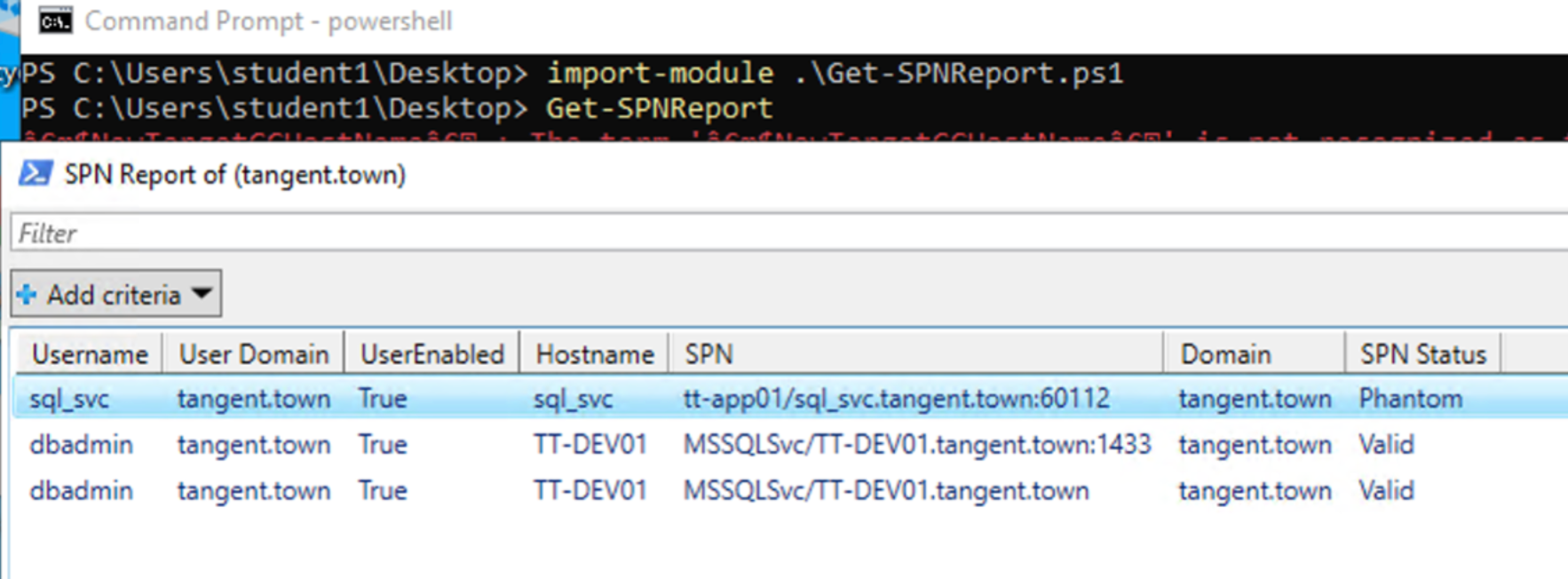
In my test environment, this script correctly identified my *sql_svc* account as being "phantom" because the SQL service had been uninstalled but the SPN wasn’t cleaned up. So now I can use the `setspn` command to do the final cleanup via [this article](https://learn.microsoft.com/en-us/previous-versions/windows/it-pro/windows-server-2012-r2-and-2012/cc731241(v=ws.11)):

## Video demonstration